Archive for the 'General' Category
New Years Resolutions
During the 5 years this illustrious blog has been in existence I’ve averaged an amazing 5 posts per year. During that same period, I’ve changed blog engines 4 times, averaging slightly over 6 posts per blogging engine. I’ve also got more plugins running than you can imagine. What does this tell me? I like maintaining my blog more than I like to post on it.
I’ve tried to determine the reasons, and have come up with the following:
I like tech, just not writing about it – It’s not that I’m not paying attention to what’s going on, I’m doing more of that than ever, I’m just not producing any content. Part of that is I haven’t really found my online writing voice. I have a bunch of half-finished posts that just need a ‘few more words’. Just getting in the habit of getting something out there more frequently should help.
Work topics – Most things have been related to the technologies that I’m using at work. If I solve a big problem or come up with something cool at work, I usually don’t want to go home and write about it.
Code Complete – The internet is a scary place for code…if you post it someone might actually use it! I’ve got a group of posts where I have some code done for them, but it isn’t very pretty. I think I’ll just put a scary warning on all my posts that the code probably didn’t ever work and if it did it’ll delete everything on your machine.
My 2010 resolution? How about posting on this thing a bit more. I’ll go crazy and say I’d like to DOUBLE my posting this year. Aim high, right? To help meet my goal I’ve come up with a series idea, I’m going to implement something this year and talk about it on my blog. What will it be? Well, if I string it out into another post I’ll already be 20% complete with meeting my resolution.
Who knows, maybe I’ll even get to use some of those fancy plugins this year.
1 commentMODIG Client Object Model Presentation
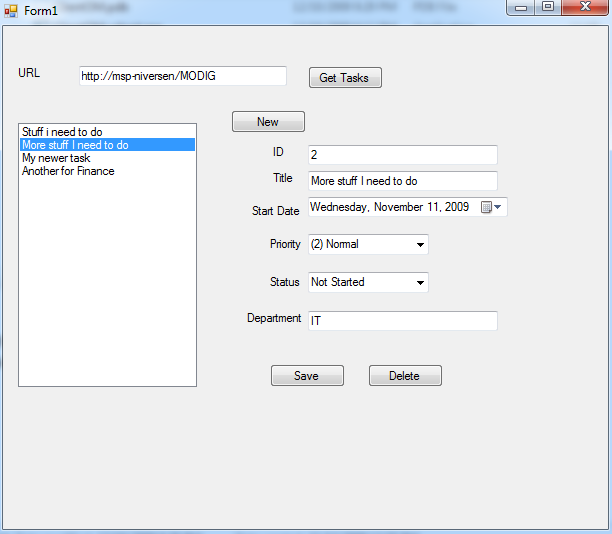
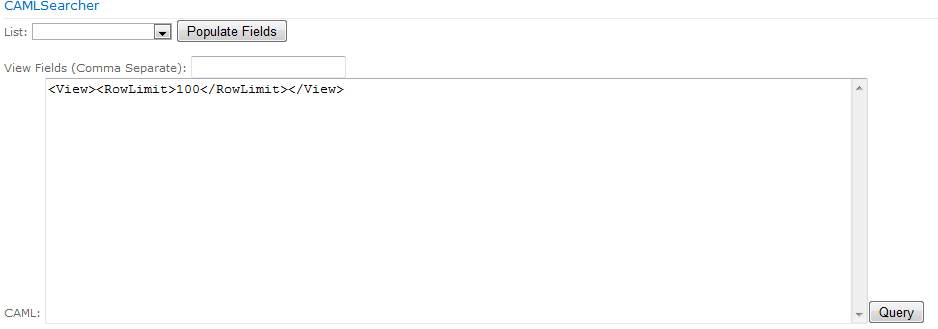
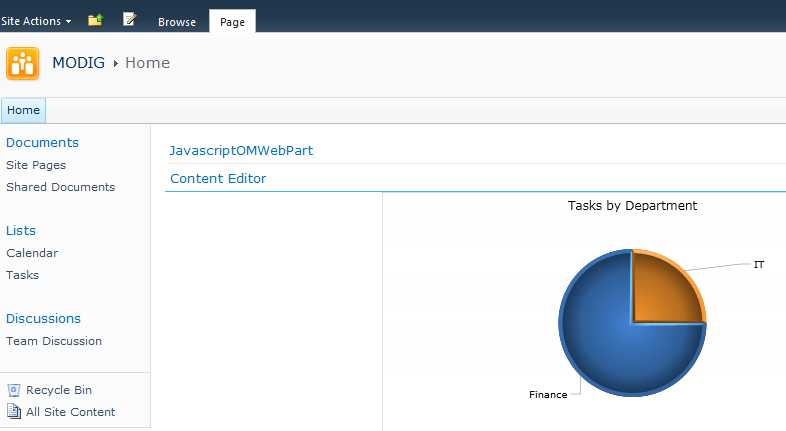
Tonight I gave a presentation at MODIG about the Client Object Model. In the presentation I had three demos: one WinForm, one Javascript and one Silverlight. The WinForm app does full CRUD against my Tasks list. The javascript control has a dropdown list of the lists on the site, a list of the available fields you can use and then a box to put your CAML and then the results of your query are displayed. The Silverlight control is a quick demo of doing some graphing on my Tasks list using the Visifire graphing library. Just a note if you are going to run these, the .NET and SL parts are expecting a column called ‘Department’ in the Tasks list.
 Presentation
 Code
CodeOn the Spaghetti Code Podcast
Looking for something to do for that last day of vacation before you head back to work? Hit download and kick back with your favorite mp3 player and enjoy a new podcast! Jeff was kind enough to invite me back onto his Spaghetti Code Podcast to talk about one of my favorite things, PowerShell!
Since it was posted, the PowerShell team has dropped CTP 3 of PowerShell. Be sure to check it out too.
No commentsDevConnections 2008: The Feature/Solution Duo
I had two presentations about deployment with Features and Solutions at DevConnections. One was more around the ‘why’ and the other about the ‘how’ I’ve uploaded both of the slide decks and associated code that was demoed. Most of the code is pretty rough for this, it works in my demo but you probably don’t want to deploy it to your production server. That said, the code will give you a good idea of some potential approaches you can use in your own environment. Feel free to copy/paste whatever you need into your own projects. I’ll be going into some more detail on several of the approaches and samples later, at which point I’ll be releasing a version that is a bit more cleaned up.
 Effectively Using Features and Solutions
 EffectiveFeatures.zip
Packaging Your Advanced SharePoint Customizations
DevConnections 2008: Automating Common Tasks with PowerShell
One session down, two to go! There was a good turnout at today’s session, about half the people had worked with SharePoint, and the other half were new. The audience members had some great questions about using PowerShell and SharePoint.
Below I have a text file with all the commands I entered during the session (thanks ‘get-history’), the script library file that I used for the demo and the slide deck. If you are looking for the IDisposable or the PowerShell web part stuff its not in either of those. I’ll be putting those up in separate posts, the web part because I want to clean i up and IDiposable because I want a little more testing before I unleash it on the world.
I’m also interested in feedback with the SharePointCmds.ps1 file in terms of what is useful and what commands are missing. If people find value in it I’ll maintaining it, extend it and generally make it more useful. Feel free to drop me any comments.
Automating Common Sharepoint Tasks with PowerShell
DevConnections Fall 2008
Its that time again, time for me to double my posts for the year. That can only mean one thing, its DevConnections! I’ve got three sessions this year:
Automating Common SharePoint Tasks with PowerShell
– Wednesday 11:45am in South Seas A&B
Effectively Using Features and Solutions
– Wednesday 4:30pm in South Seas A&B
Packaging Your Advanced SharePoint Customizations
– Thursday 3:00pm in South Seas A&B
I’ll be putting all the slides and content up after the presentations, so if any of these presentations interest you, check back later. If you are at the convention, drop me a note.
No commentsI’m on a Podcast!
Jeff Brand interviewed me for his Spaghetti Code podcast that was just published. The topic was SharePoint Development. Its my first time doing a podcast and was a very interesting experience. Talking into a mic with just one other person in the room (except for the intro, those 100s of people are really there…then they just leave) was a little weird at first. Jeff was a great host and really helped me feel comfortable doing my first podcast.
Check it out!
No commentsA New Addition to SharePoint Workflow
K2, best known for their enterprise grade workflow engine, has recently released information on their latest product, K2 blackpoint. They are positioning this product for use when you need something more powerful than SharePoint Designer, don’t want to write custom code and don’t need the advanced features (or cost) of their primary workflow product, K2 blackpearl.
I haven’t played extensively with it yet, but they do have a good overview video and a trial download to check out. I’m looking forward to putting it through its paces in the coming weeks.
K2 is also having a little contest, like an internet scavenger hunt, where you can win prizes and everlasting internet fame. In order to win, you need to find some images scattered across various sites, blogs and webcasts. Luckily for you, you’ve found one such location.

Debugging Features the Easy Way
I once heard an analogy that navigating a submarine was like painting
over all the windows in your car, cracking the window and a attempting
to drive somewhere using only sound. Since I don’t have a sub handy I can’t speak to the accuracy of that, but sometimes debugging in SharePoint seems only slightly easier.
If you’ve ever created a FeatureReceiver, then you’ve probably also
had it not work. There’s some code that’ll work right the first time
for you, that never seems to be a custom feature. When the feature
doesn’t work you either don’t get the result you were expecting, or
worse, Something Bad Happened. Even if you assume that you’ve already got
your development environment set up so you can debug a web part, its
not immediately obvious how to debug that feature that’s causing your
problems.
Well, you’ve come to the right place! Here’s a couple options to fix
up your broken feature:
Attach to w3wp (aka Its Still SharePoint)
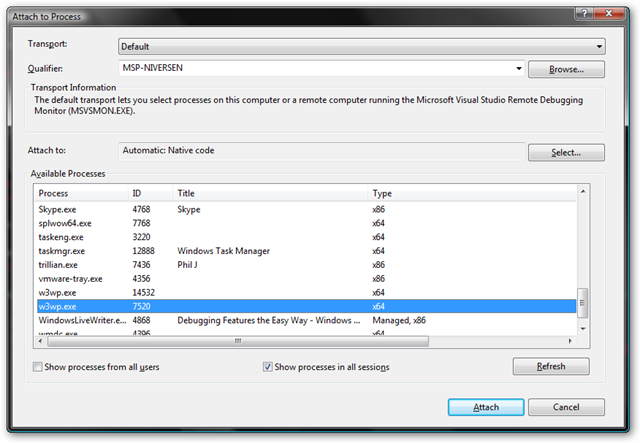
If you’ve ever (successfully) debugged in SharePoint you are probably familiar with this approach. Fire up visual studio and attach to the w3wp.exe process and then Activate the feature. Setting a breakpoint in your FeatureActivated and activating the feature through the web UI works in the debugger like you’d expect, so why not just stick with this approach? The biggest reason is you can’t do the same thing for FeatureInstalled or FeatureUninstalling. Since you have to use STSADM for those actions, attaching to w3wp isn’t going to do anything for you.
Console/Debug.WriteLine (aka printf forever!) 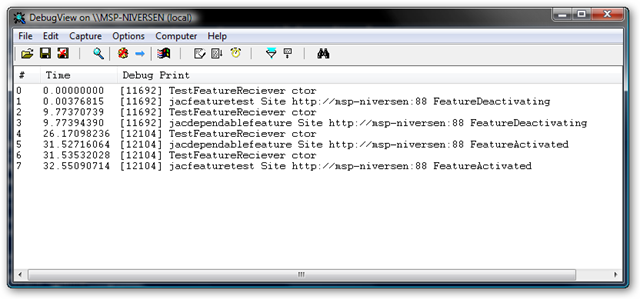
Bring on that retro flavor! Liberally sprinkle Console.WriteLine’s in your code and you’ll feel like you’ve been teleported back in time and you are writing a C based console app, or at least like a Response.Write from classic ASP. Using the WriteLines you can ‘debug’ your code without the use of a debugger and you now have access to Installed and Uninstalling. If you are using stsadm, Console.WriteLine will work fine. If you are activating via the web, or just don’t like other people to see your debugging messages you can use Debug.WriteLine and view the output with something like DebugView. The downside is you have to use STSADM to do your Installation and Deactivation and don’t really have the option of using a debugger if you wanted to. You’ll have to be pretty quick to attach to the STSADM process before it finishes (or be on a really slow server).
Force the Debugger (aka The Easy Way)
The previous two options have each been useful but have had some pretty serious caveats to using them for everything, if only there was another way!. Luckily there is, we can just force the debugger to run. By putting the line System.Diagnostics.Debugger.Launch(); in our code, it’ll attempt to start the debugger. This approach will work regardless of if you are using STSADM or the UI. You’ll be presented with the "Launch Visual Studio" dialog. If you’ve already got the project open, select your running instance of Visual Studio. Otherwise open a new instance and browse to find your code.
These options should get you on the right track, and who knows, you might even
start like writing FeatureReceivers…or not.
Finding a SPWeb with one hand behind your back
Well, maybe not one hand behind your back, but what if you only have the ID of the web? I received this question after presenting a session at the Twin Cities SharePoint Camp. I knew you could grab an SPWeb if you knew its URL using SPSite.OpenWeb, but what if you only had the ID?
Worst case solution would be to recursively go through all the Webs and SubWebs in order to find one with a matching ID. Another possible, though horrible, approach would be to query the SharePoint database and get the URL from that. Both of those are pretty bad approaches to what is seemingly a simple problem.
After spending a couple minutes with the SDK I found there was a much cleaner approach available, SPSite.AllWebs. SPSite has an AllWebs property that has ALL the webs under it, not just the top level ones. It also has an indexer on it that takes in a guid, giving us our perfect Web by ID scenario.
PowerShell Code:
[system.reflection.assembly]::loadwithpartialname("microsoft.sharepoint")
$site = new-object Microsoft.SharePoint.SPSite("http://mysite/")
$siteid = new guid("22625614-bb87-4cb1-a817-52f8a7366640")
$web = $site.AllWebs[$siteid]
$web.Url
Result: http://mysite/toplevel/secondlevel/YouFoundMe
Success!